
Yesterday I published a post about setting up an AI personal assistant on a Mac Mini with OpenClaw. It took a fair amount of work to write.
I woke up this morning and the landscape had already shifted.
The Timing Is Almost Eerie
March 24: I publish my OpenClaw setup guide. March 25: Anthropic announces Claude Computer Use.
One day apart. Exactly one day.
But here’s what makes it even more uncanny: the timeline.
In February, OpenAI acquired OpenClaw — or more precisely, they hired its creator Peter Steinberger. OpenClaw had 196,000 GitHub stars and 2 million weekly active users. It was the hottest open-source AI agent on the market.
Then, roughly a month later, Anthropic rolls out a competing feature.
Coincidence? Hard to believe.
Whether Anthropic fast-tracked this in response to OpenAI’s acquisition, or they’d been working on it all along and the timing just happened to line up — either way, my carefully written setup guide almost became “the old way of doing things” overnight.
What Is Claude Computer Use?
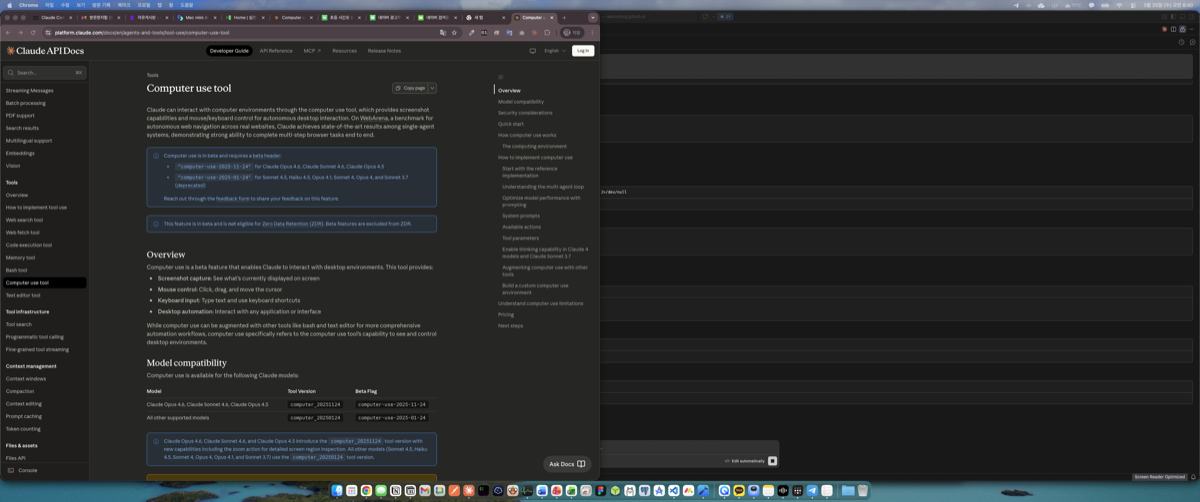
In simple terms, Claude can now see your screen and directly control your mouse and keyboard.
OpenClaw operates through APIs. It reads emails, registers calendar events, and reports via Telegram — all through API calls. It never needs to see your screen.
Computer Use is different. It literally looks at your screen and clicks around like a human would.
Key capabilities:
- Screenshot capture: Sees what’s currently displayed on screen
- Mouse control: Click, drag, and cursor movement
- Keyboard input: Typing and keyboard shortcuts
- Desktop automation: Can interact with any application
There’s demo footage of it sending KakaoTalk messages. Since KakaoTalk doesn’t have an API, that’s something OpenClaw simply cannot do. Computer Use just opens the app and types the message. That was genuinely surprising.
Current state:
- Beta / research preview
- macOS only (no Windows or Linux yet)
- Available to Claude Pro and Max subscribers only
- Still slow and somewhat error-prone
It’s far from polished. But the fact that it exists at all signals where things are headed.
OpenClaw vs Claude Computer Use
Just yesterday, OpenClaw felt like the only real option for a personal AI assistant. Twenty-four hours later, it has a competitor.
Here’s how they compare:
OpenClaw
- Open source (196K GitHub stars)
- Cross-platform: Windows, macOS, Linux
- Model-agnostic (Claude, GPT, local models)
- Runs as a 24/7 background daemon
- API-based — no screen interaction
- Community-driven extensions
Claude Computer Use
- First-party Anthropic feature
- macOS only (for now)
- Claude models only
- Session-based execution
- Sees the screen, controls mouse and keyboard
- Permission-gated safety model
The interesting thing is that neither is a finished product.
OpenClaw can’t interact with screens since it works through APIs. Computer Use can interact with screens but it’s still slow and unreliable. Neither qualifies as a “perfect personal assistant” yet.
But the direction is the same: AI that does your work on your computer. They just approach it differently.
2026: The Year of the AI Personal Assistant War
This whole episode has made one thing clear to me. 2026 is going to be the year of the AI personal assistant war.
OpenAI acquiring OpenClaw was a signal. They’re serious about this space — moving beyond chatbots to agents that take action on your machine.
Anthropic releasing Computer Use is their own answer. Not a copycat, but a different approach. Screen-level interaction is arguably a step beyond what OpenClaw does.
Google won’t sit still either. Expect something from the Gemini camp this year.
My prediction: by the end of 2026, OpenAI, Anthropic, and Google will all have shipped comprehensive personal assistant capabilities.
What worries me is companies like Genspace and Skywork that have been building similar services. When the big players move this fast, it’s a direct hit.
I wrote about how AI is changing everyday work not long ago. The pace at which AI is becoming embedded in daily life is faster than even I expected.
What I’m Going to Do
For now, I’m keeping my OpenClaw setup. I put in real effort yesterday — I’m not about to throw that away. Plus, OpenClaw is open source, which means I control it on my own server. That matters.
I’ll also be trying Computer Use as soon as possible. I’m on a Pro subscription, so it should be available right away. I’ll post a comparison once I’ve had some time with it.
It’s possible I’ll end up using both. OpenClaw runs batch jobs 24/7 in the background. Computer Use handles screen-dependent tasks on demand. They could complement each other nicely.
Yesterday I wrote “this is the future” while setting up OpenClaw. One day later, that future has already evolved.
The speed of this market is something else. What’s cutting-edge today is yesterday’s news tomorrow.
I’ll report back once I’ve tried Computer Use firsthand.